Many schools still rely on manual methods such as paper registers or spreadsheetsto track student attendance. While simple, these approaches are error-prone, time-consuming, and make it difficult to aggregate data, generate reports, or identify attendance trends over time.
In most cases, teachers bear the operational burden of marking attendance daily, calculating attendance summaries manually, and submitting reports to administrators. These inefficiencies can lead to delayed interventions for students with chronic absenteeism, poor record-keeping, and administrative overhead.

To address these limitations, we aim to design a School Attendance Management System that enables teachers to mark student attendance and generate attendance reports for their assigned classes.
Functional Requirements
Design the backend infrastructure for a locally networked, in-memory Attendance Management System that enables teachers to:
-
Create classes and register students at the beginning of each session.
-
Record daily attendance for every student in their respective classes.
-
Generate and view attendance reports for any selected class.
Sequence Flow
The Attendance Management System allows a teacher (main actor) to perform key actions (use cases) such as create a new class, add a student to an existing class, mark daily class attendance and generate class attendance report.
Let’s understand the step-by-step sequence flow of each use case to gain deeper insights into how teachers interact with the system, how data flows during runtime, and how each feature functions within a memory-only environment.
Use Case 1: Create a New Class
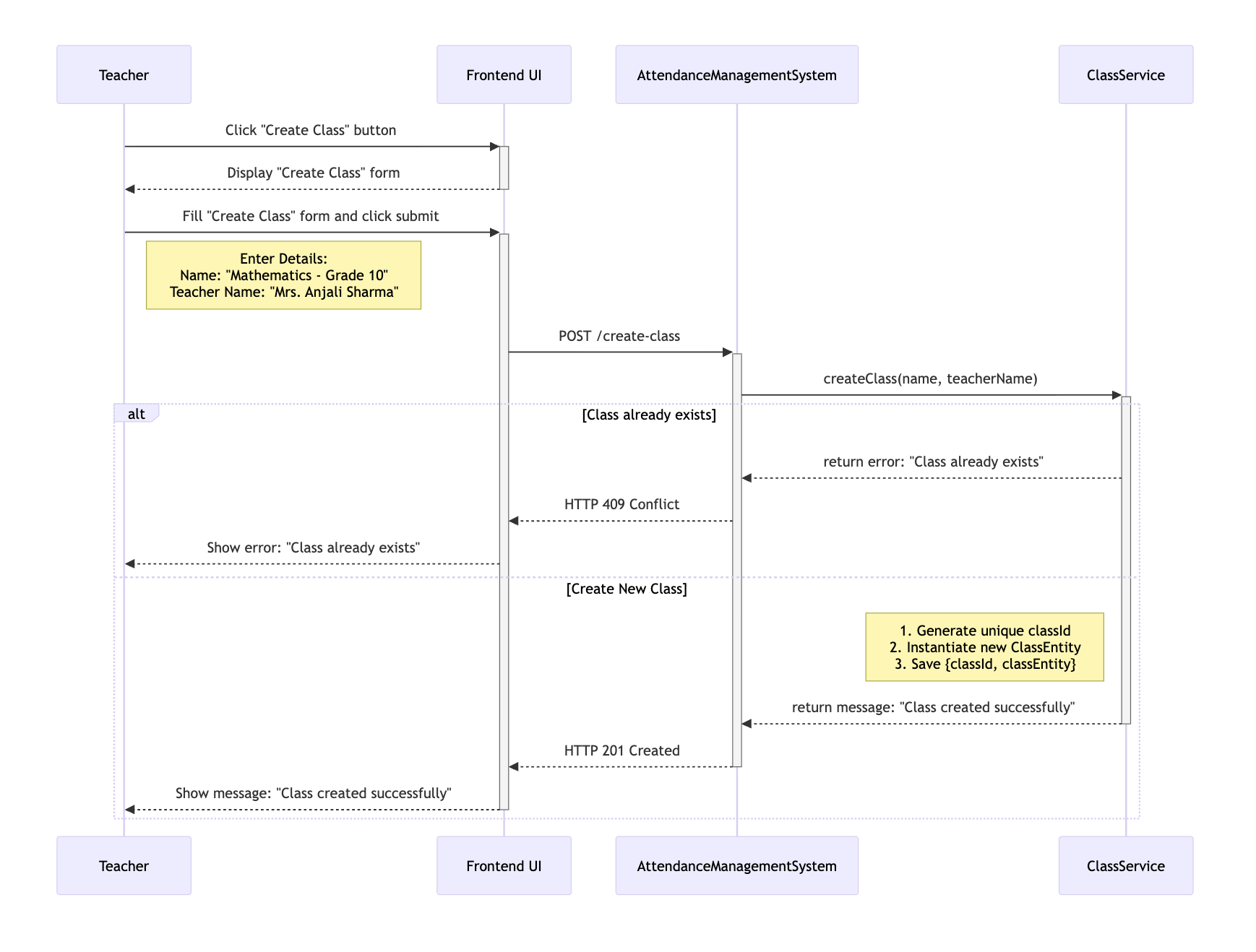
This use case allows a teacher to define a new class at the beginning of an academic session. The following interactions describe the step-by-step flow of this operation between the user interface and backend components.
-
A Teacher initiates the process by clicking the "Create Class" button from the UI.
-
The UI displays the "Create Class" form and prompts the Teacher to enter class details such as Name and assigned TeacherName.
-
Upon submitting the form, the frontend sends a POST /create-class request to the AttendanceManagementSystem, including the provided class details.
-
The AttendanceManagementSystem intercepts the request, extracts request parameters: name and teacherName, and invokes the createClass(name, teacherName) method within the ClassService.
-
The createClass() method validates if a ClassEntity with the same name already exists. Upon successful validation, it generates a unique classId, instantiates a new ClassEntity and saves the [classId, classEntity] mapping in the in-memory classRegistry.
-
Finally, an HTTP response is returned to the UI, stating whether the ClassEntity has been created or not.
Use Case 2: Add a Student to Existing Class
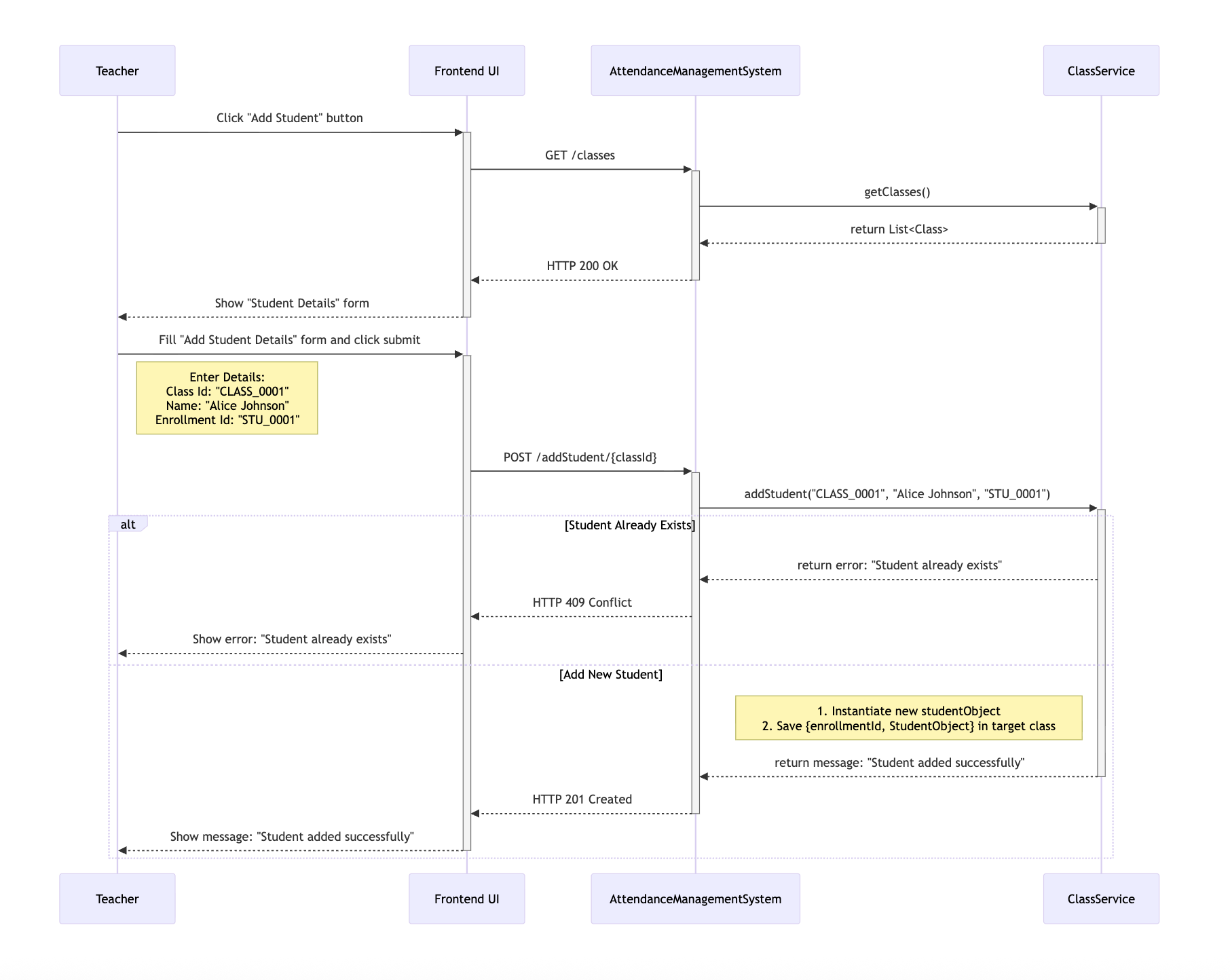
This use case enables a teacher to add a new student to one of the existing classes. The following interactions outline the complete step-by-step flow from initiating the action to successful student registration.
-
The Teacher begins the process by clicking the "Add Student" button from the UI.
-
The frontend sends a GET \classes request to the AttendanceManagementSystem to populate "Select Class" menu with the list of existing classes.
-
The UI then displays the "Add Student Details" form and prompts the Teacher to select the desired class and enters student details such as name and enrollmentId.
-
Upon submitting the form, the frontend sends a POST /add-student/[classId] request to the AttendanceManagementSystem, including the student's details.
-
The AttendanceManagementSystem intercepts the request, extracts request parameters: classId, name and enrollmentId, and invokes the addStudent(classId, enrollmentId, name) method within the ClassService.
-
The addStudent() method validates whether a Student with the same enrollmentId already exists in the target Class. Upon successful validation, it instantiates a new studentObject and adds the [enrollmentId, studentObject] mapping to the studentRegistry of the target Class.
-
Finally, an HTTP response is returned to the UI, confirming whether the Student has been added to the target Class or not.
Use Case 3: Mark Daily Attendance
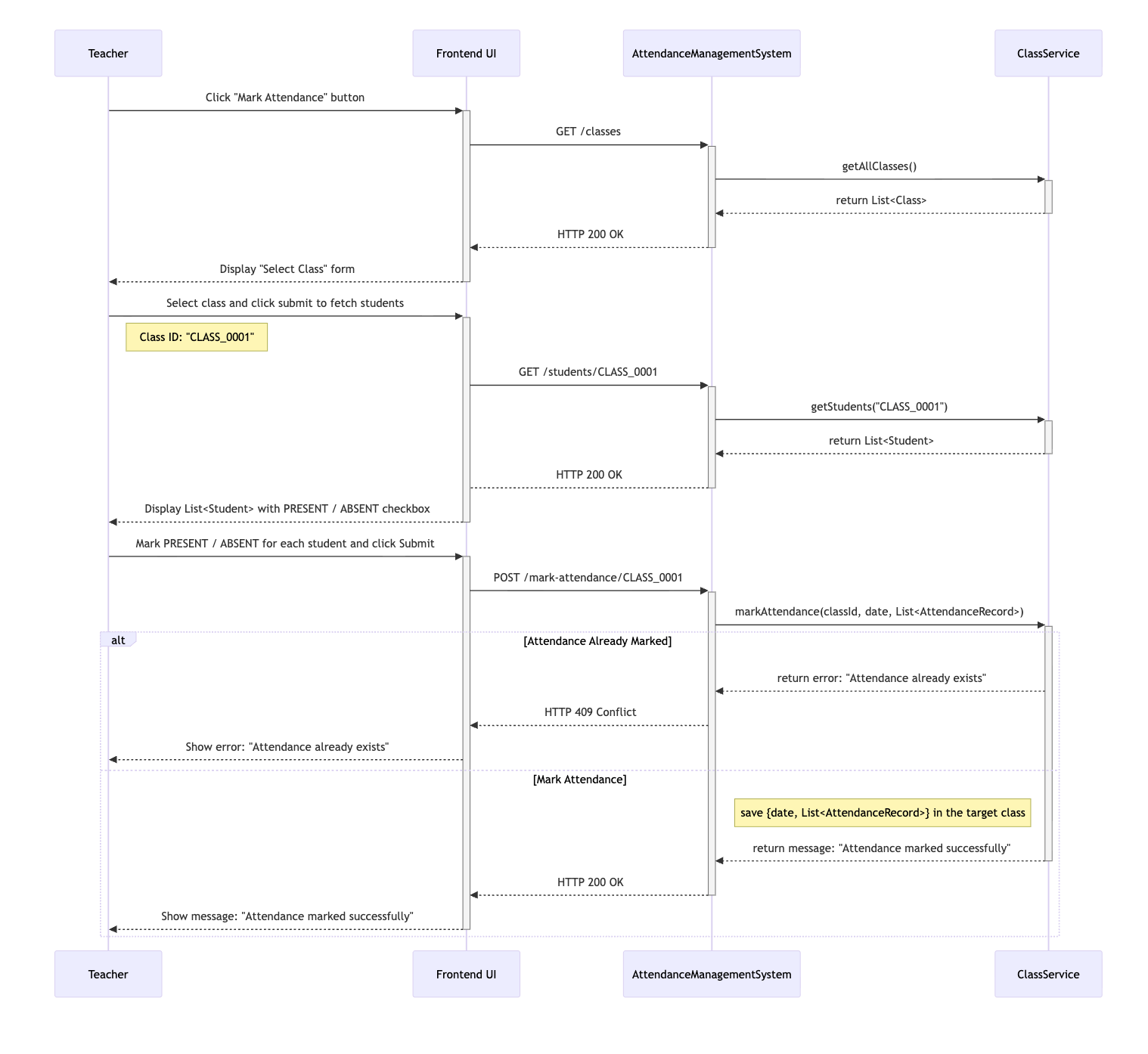
This use case allows a teacher to record daily attendance for all students in a selected class. The interactions below describe this flow in detail.
-
The Teacher begins the process by clicking the "Mark Attendance" button from the UI.
-
The frontend sends a GET /classes request to the AttendanceManagementSystem to populate the "Select Class" drop down with the list of existing classes.
-
The UI then displays a "Select Class" form and prompts the Teacher to select a class.
-
Upon selecting a class, the frontend sends a GET /students/[classId] to the AttendanceManagementSystem to populate the "Mark Attendance" from with the List:Student: in the target Class.
-
The UI then displays the "Mark Attendance" form and prompts the Teacher to go through each Student and mark its attendanceStatus as PRESENT or ABSENT.
-
Upon submitting the form, the frontend sends a POST /mark-attendance/[classId] request to the AttendanceManagementSystem, including today's date and List:StudentAttendanceRecord.
-
The AttendanceManagementSystem intercepts the requests, extracts request parameters: classId, date and List:StudentAttendanceRecord, and invokes the markAttendance(classId, date, List:StudentAttendanceRecord> method within the ClassService.
-
The markAttendance() method validates whether the attendance for the target Class for today's date is already marked or not. Upon successful validation, it adds the [date, List:StudentAttendanceRecord] mapping to the attendanceRegistry of the target Class.
-
Finally, an HTTP response is returned to the UI, confirming whether the attendance for all Student in the target Class is marked for today's date or not.
Use Case 4: Generate Class Attendance Report
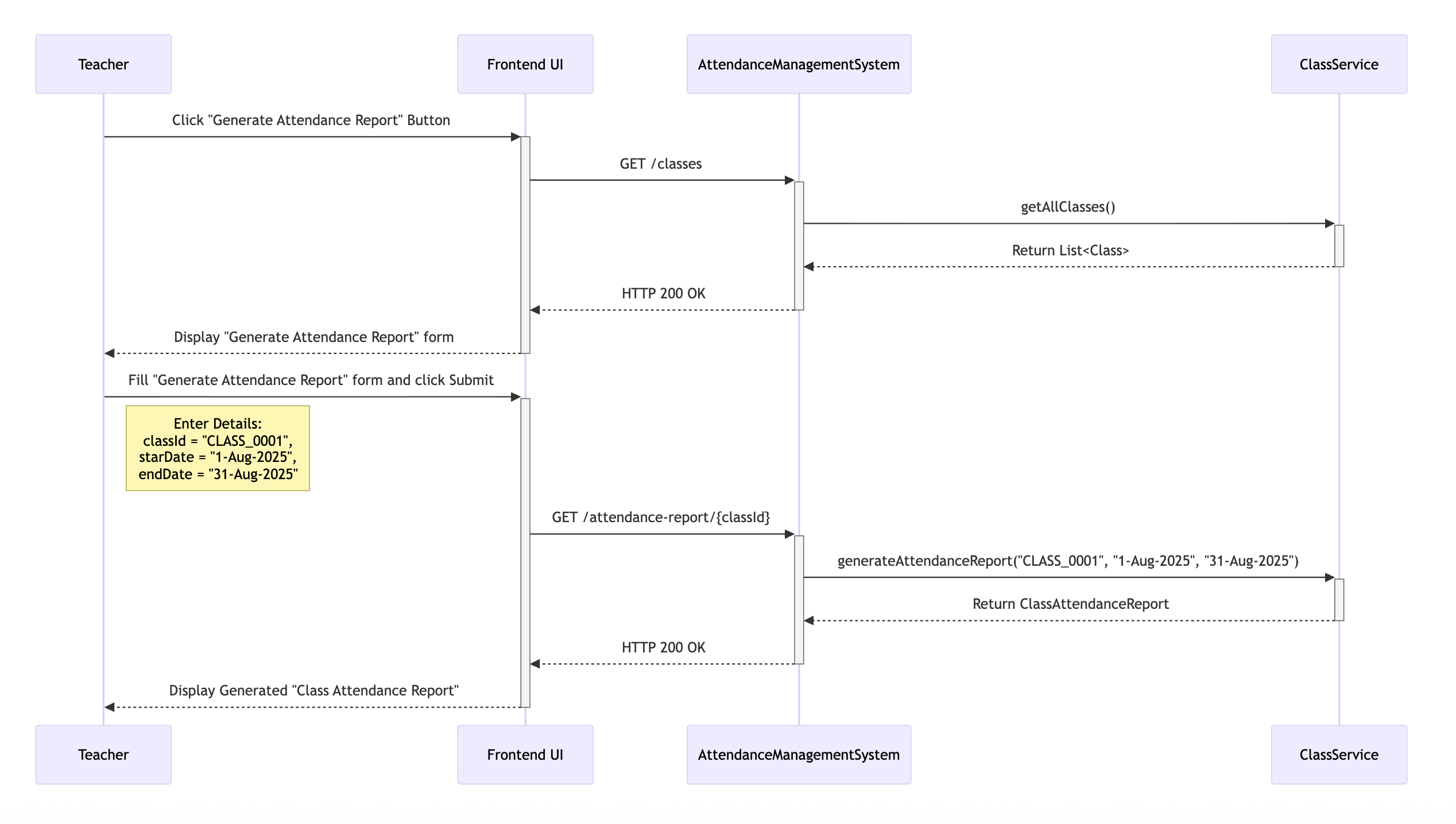
This use case allows a teacher to generate and view the attendance summaries for a selected class for a defined date range. The interactions below illustrate the step-by-step process of how this report is generated and delivered to the teacher through the UI.
-
The Teacher clicks the "Generate Attendance Report" button from the UI.
-
The frontend sends a GET /classes request to the AttendanceManagementSystem to populate the "Select Class" dropdown with the list of existing classes.
-
The UI then displays the 'Generate Attendance Report' form, prompting the Teacher to select a class along with the startDateand endDate.
-
Upon submitting the form, the frontend sends a GET /attendance-report/[classId] request to the AttendanceManagementSystem, including the selected startDate and endDate.
-
The AttendanceManagementSystem intercepts the request, extracts request parameters: classId, startDate and endDate and invokes the generateAttendanceReport(classId, startDate, endDate) method within the ClassService.
-
The generateAttendanceReport() method filters the List:StudentAttendanceRecord for the target class that lie between the startDate and the endDate, aggregates the filtered List:StudentAttendanceRecord as List:StudentAttendanceStats and saves it in ClassAttendanceReport along with other details like className, startDate and endDate.
-
Finally, an HTTP response containing the aggregated List:StudentAttendanceStats is returned to the UI, where it is typically presented in a tabular format like:
| Roll Number | Name | Total Present | Total Absent | Attendance % |
|---|---|---|---|---|
| 1 | Alice | 20 | 2 | 91.3 |
| 2 | Bob | 18 | 3 | 86.9 |
Data Model Design
The in-memory data model for the Attendance Management System can be broken down into three subgroups: Domain Objects, Data Transfer Objects (DTOs) and Centralized Data Repositories.
Let’s discuss each in detail to understand their roles and responsibilities within the system.
Domain Objects
Represent the core entities such as ClassEntity, StudentEntity and StudentAttendanceRecord, responsible for modeling the real-world concepts of classes, students, and daily attendance.
- ClassEntity: Represents a school class and acts as the primary container for both student and attendance registries.
| Field | Type | Description |
|---|---|---|
| id | String | Unique identifier for the class. |
| name | String | Human-readable class name. |
| teacherName | String | Name of the assigned teacher. |
| studentRegistry | Map[String, StudentEntity] | Registry of students, keyed by enrollmentId. |
| attendanceRegistry | Map[LocalDate, List[StudentAttendanceRecord]] | Registry of daily attendance, keyed by date. |
NOTE: Since both studentRegistry and attendanceRegistry are scoped to a single ClassEntity, they are not shared across multiple threads or teachers. Each teacher will only interact with their own class instance, so a simple HashMap is sufficient for both registries.
- StudentEntity: Represents a student enrolled in a class.
| Field | Type | Description |
|---|---|---|
| enrollmentId | String | Unique identifier for each student within a class. |
| name | String | Student’s full name. |
- StudentAttendanceRecord: Represents an attendance mark for a student.
| Field | Type | Description |
|---|---|---|
| enrollmentId | String | Identifier linking back to the corresponding StudentEntity. |
| name | String | Student’s name (stored redundantly for easier reporting and faster lookups). |
| attendanceStatus | String | Attendance status for the date (PRESENT / ABSENT). |
Data Transfer Objects (DTOs)
Act as lightweight carriers for exchanging data across layers. These include StudentAttendanceStats and ClassAttendanceReport, which are primarily used for aggregating and presenting attendance information.
- StudentAttendanceStats: Represents aggregated attendance stats per student over a date range.
| Field | Type | Description |
|---|---|---|
| enrollmentId | String | Identifier linking back to the corresponding StudentEntity. |
| name | String | Student’s full name. |
| totalPresent | int | Total number of days the student was marked present. |
| totalAbsent | int | Total number of days the student was marked absent. |
| attendancePercentage | double | Percentage of attendance over the selected date range. |
- ClassAttendanceReport: Represents the report output for a class.
| Field | Type | Description |
|---|---|---|
| className | String | Name of the class this report belongs to. |
| startDate | LocalDate | Start date of the reporting window. |
| endDate | LocalDate | End date of the reporting window. |
| attendanceSummary | List[StudentAttendanceStats] | Summary of attendance statistics for all students. |
Centralized Data Repositories
Provide centralized, in-memory storage of all ClassEntity instances.
NOTE: Centralized access ensures persistence (within memory) of classes across different operations.
A HashMap provides efficient key-based access and retrieval, making it a natural choice for storing classes. However, in a multi-user environment where multiple teachers may simultaneously add or modify classes, using a regular HashMap can lead to concurrency issues such as data inconsistency and race conditions.
To address this, we use a ConcurrentHashMap, which is thread-safe and designed for concurrent read and write operations.
Map<String, ClassEntity> classRegistry = new ConcurrentHashMap<>();
In this model, each classId maps to its corresponding ClassEntity, effectively serving as the system’s single source of truth for managing classes across the application.
API Design
The Attendance Management System APIs are structured into four primary resource groups, each addressing a core aspect of the system: Class API, Student API, Attendance API, and Report API.
Let's discuss each in detail, outlining their endpoints, request formats, business logic and response structures.
Class API
Responsible for managing all operations related to class creation and retrieval of class details.
Endpoint 1: POST /create-class
Use this endpoint to create a new class. It accepts class details such as the class name and teacherName in the request body.
Sample Request Body
{
  "name": "Mathematics - Grade 10",
  "teacherName": "Mrs. Anjali Sharma"
}
The AttendanceManagementSystem intercepts the request, extracts request parameters: name and teacherName, and invokes the createClass(name, teacherName) method within the ClassService.
Business Logic
public boolean createClass(String name, String teacherName) {

    // Step 1: Check if class with same name already exists
    boolean exists = classMap.values().stream()
            .anyMatch(obj->obj.getName().equalsIgnoreCase(req.getClassName()));
    if(exists) return false;

    // Step 2: Create a new class
    String classId = generateClassId();
    Class class = new Class(classId, req.getClassName(), req.getTeacherName());
    classMap.put(classId, class);
    return true;

}
Class Id Generator
private int classCounter;

private String generateClassId() {
    return "CLASS_" + String.format("%04d", ++classCounter);
}
Upon successful creation (HTTP 201 Created), the AttendanceManagementSystem returns a statusMessage confirming the class has been created successfully, while failures return the appropriate error status code (e.g., HTTP 409 Conflict).
Sample Response Body
Class created successfully
Endpoint 2: GET /classes
Use this endpoint to retrieve all available classes. It accepts no request body.
The AttendanceManagementSystem intercepts the request and invokes the getAllClasses() method within the ClassService.
Business Logic
public List<ClassEntity> getAllClasses() {
    return classRegistry.values();
}
Upon successful retrieval (HTTP 200 OK), AttendanceManagementSystem returns a JSON array containing each class’s unique classId and name, while an empty result returns HTTP 204 No Content.
Sample Response
[
  {
    "classId": 101,
    "className": "Mathematics - Grade 10",
  },
  {
    "classId": 102,
    "className": "Science - Grade 10",
  }
]
Student API
Responsible for managing student enrollment within classes and retrieving student details.
Endpoint 1: POST /add-student/[classId]
Use this endpoint to add a new student to the specified class. It accepts the student’s details in the request body and uses the classId provided in the path parameter to identify the target class.
Sample Request Body
{
  "enrollmentId": "STU_0001",
  "name": "John Doe"
}
The AttendanceManagementSystem intercepts the request, extracts request parameters: classId, name and enrollmentId, and invokes the addStudent(classId, enrollmentId, name) method within the ClassService.
Business Logic
public boolean addStudent(String classId, String enrollmentId, String name) {

    // Step 1: Check if the student already exists in the class
    ClassEntity classEntity = classRegistry.get(classId);
    boolean exists = classEntity.getStudents().containsKey(enrollmentId);
    if(exists) return false;

    // Step 2: Create a student and add it to the target class
    StudentEntity studentEntity = new StudentEntity(enrollmentId, name);
    classEntity.getStudents().put(enrollmentId, studentEntity);
    return true;

}
Upon successful creation (HTTP 201 Created), the AttendanceManagementSystem returns the student’s unique ID along with the full student record, while failures return the appropriate error status code (e.g., HTTP 409 Conflict).
Sample Response Body
Student added successfully
Endpoint 2: GET /students/[classId]
Use this endpoint to fetch all students enrolled in a given class. It accepts no request body and uses the classId provided in the path parameter to identify the target class.
The AttendanceManagementSystem intercepts the request and invokes getStudents(classId) method within the ClassService.
Business Logic
public List<StudentEntity> getStudents(String classId) {
    return classRegistry.get(classId).getStudentRegistry().values();
}
Upon successful retrieval (HTTP 200 OK), the AttendanceManagementSystem returns details of each student in the class, while failures return the appropriate error status code (e.g., HTTP 400 Bad Request).
Sample Response Body
[
    {
      "enrollmentId": "STU-001",
      "name": "Riya Verma"
    },
    {
      "enrollmentId": "STU-002",
      "name": "Arjun Singh"
    },
    {
      "enrollmentId": "STU-003",
      "name": "Meena Kapoor"
    }
]
NOTE: All endpoints are scoped under a classId, since a student cannot exist outside a class in our in-memory design.
Attendance API
Responsible for marking and retrieving attendance records for students in a class.
Endpoint 1: POST /mark-attendance/[classId]
Use this endpoint to mark the attendance for students in a specific class. It accepts the classId as a path variable and the attendance details such as today's date and individual student attendance status in the request body.
Sample Request Body
{
	"date": "2025-08-12",
	"records": [
		{
		    "enrollmentId": "STU_0001",
		    "studentName": "Alice",
		    "status": "PRESENT"
		},
	    {
		    "enrollmentId": "STU_0002",
		    "studentName": "Bob",
		    "status": "ABSENT"
		}
	  ]
}
The AttendanceManagementSystem intercepts the requests, extracts request parameters: classId, date and List[StudentAttendanceRecord], and invokes the markAttendance(classId, date, List[StudentAttendanceRecord]) method within the ClassService.
Business Logic
public boolean markAttendance(String classId, LocalDate date,
											List<AttendanceRecord> records) {

    // Step 1: Check if attendance for today's date is already marked
    Class class = classMap.get(classId);
    boolean exists = class.getAttendanceRecords().containsKey(date);
    if(exists) return false;

    // Step 2: Add attendance records for today's date to the target class
    class.getAttendanceRecords().put(date, records);
    return true;

}
Upon successful marking of attendance (HTTP 200 OK), the response returns a confirmation message, while failure (HTTP 400 Bad Request) returns an error message detailing the reason.
Sample Response Body
Attendance marked successfully
Report API
Responsible for generating attendance reports for classes over a specified date range.
Endpoint 1: GET /attendance-report/[classId]
Use this endpoint to generate the attendance report for a specific class. It accepts the classId provided as a path parameter and the reporting window in the request body.
Sample Request Body
{
  "startDate": "2025-08-01",
  "endDate": "2025-08-15"
}
The AttendanceManagementSystem intercepts the request, extracts request parameters: classId, startDate and endDate and invokes the generateAttendanceReport(classId, startDate, endDate) method within the ClassService.
Business Logic
public ClassAttendanceReport generateAttendanceReport(String classId,
									LocalDate startDate, LocalDate endDate) {

    // Step 1: Filter AttendanceRecords between startDate and endDate
    ClassEntity classEntity = classMap.get(classId);
    Map<LocalDate, List<StudentAttendanceRecord>> records =
									classEntity.getStudentAttendanceRecords();
    List<StudentAttendanceRecord> filteredRecords = records.entrySet().stream()
            .filter(entry -> !entry.getKey().isBefore(startDate) &&
									        !entry.getKey().isAfter(endDate))
            .flatMap(entry -> entry.getValue().stream())
            .toList();

    // Step 2: Populate each student's StudentAttendanceStats
    Map<String, StudentAttendanceStats> statsMap = new HashMap<>();
    for(StudentAttendanceRecord record: filteredRecords) {
        StudentAttendanceStats stats = statsMap.computeIfAbsent(
		        record.getEnrollmentId(),
                k -> new StudentAttendanceStats(record.getEnrollmentId(),
								                record.getName()));
        switch(record.getStatus()) {
            case "PRESENT":
	            stats.setTotalPresent(stats.getTotalPresent()+1);
	            break;
            case "ABSENT":
	            stats.setTotalAbsent(stats.getTotalAbsent()+1);
	            break;
        }
    }

    // Step 3: Calculate the attendance percentage for each student
    int totalDaysRecorded = filteredRecords.size();
    for(Map.Entry<String, StudentAttendanceStats> entry: statsMap.entrySet()) {
        double percent = entry.getValue().getTotalPresent() / totalDaysRecorded;
        entry.getValue().setAttendancePercentage(percent);
    }

    // Step 4: Create the attendance report
    List<StudentAttendanceStats> attendanceSummary = statsMap.values();
    return new ClassAttendanceReport(classEntity.getName(), startDate, endDate,
														     attendanceSummary);
}
Upon successful processing (HTTP 200 OK), it returns a structured report summarizing a aggregate summary for each student in the target class, while any errors result in appropriate error responses (e.g., HTTP 400 Bad Request).
Sample Response Body
{
	"className": "Mathematics - Grade 10",
	"startDate": "2025-08-01",
    "endDate": "2025-08-15",
	"attendanceSummary": [
		{
		    "enrollmentId": "STU_0001",
		    "studentName": "Alice",
		    "totalPresent": 20,
		    "totalAbsent": 2,
		    "attendancePercentage": 91.3
	    },
	    {
		    "enrollmentId": "STU_0002",
		    "studentName": "Bob",
		    "totalPresent": 18,
		    "totalAbsent": 3,
		    "attendancePercentage": 86.9
	    }
	]
}