Build a comprehensive solution for efficiently managing a parking lot. The system should automate key processes such as vehicle entry, ticket generation, intelligent spot allocation, real-time occupancy tracking, and seamless vehicle exit, ensuring a smooth and reliable parking experience.

Functional Requirements
-
Support parking for motorcycles, cars, and trucks.
-
Maintain three spot types (compact, regular, oversized) with appropriate capacity.
-
Assign spots based on vehicle size, where a given vehicle type may be compatible with multiple spot types. For example, a car can be accommodated in either a compact spot or a regular spot.
-
Calculate fees using spot type and parking duration, with time-of-day rate variations.
Primary Use Cases
The parking lot system operates around two primary workflows: vehicle entry and vehicle exit. Here's how each process works:
Vehicle Entry
-
A vehicle (e.g., motorcycle, car, truck) arrives at the entry point.
-
The parking lot system captures essential details such as the license number, vehicle type, and the arrival time, and finds an appropriate available parking spot (e.g., compact, regular, or oversized) based on the vehicle type.
-
If a suitable spot is available, the system assigns the parking spot to the vehicle, generates a ticket, and returns the corresponding ticket Id to the user.
Vehicle Exit
-
The vehicle arrives at the exit gate and provides the ticket Id to the parking lot system.
-
The system retrieves the corresponding ticket and calculates the parking fee based on the duration of the stay.
-
After the payment is completed, the system marks the associated parking spot as available, updates the ticket, and allows the vehicle to exit.
Design Rationale
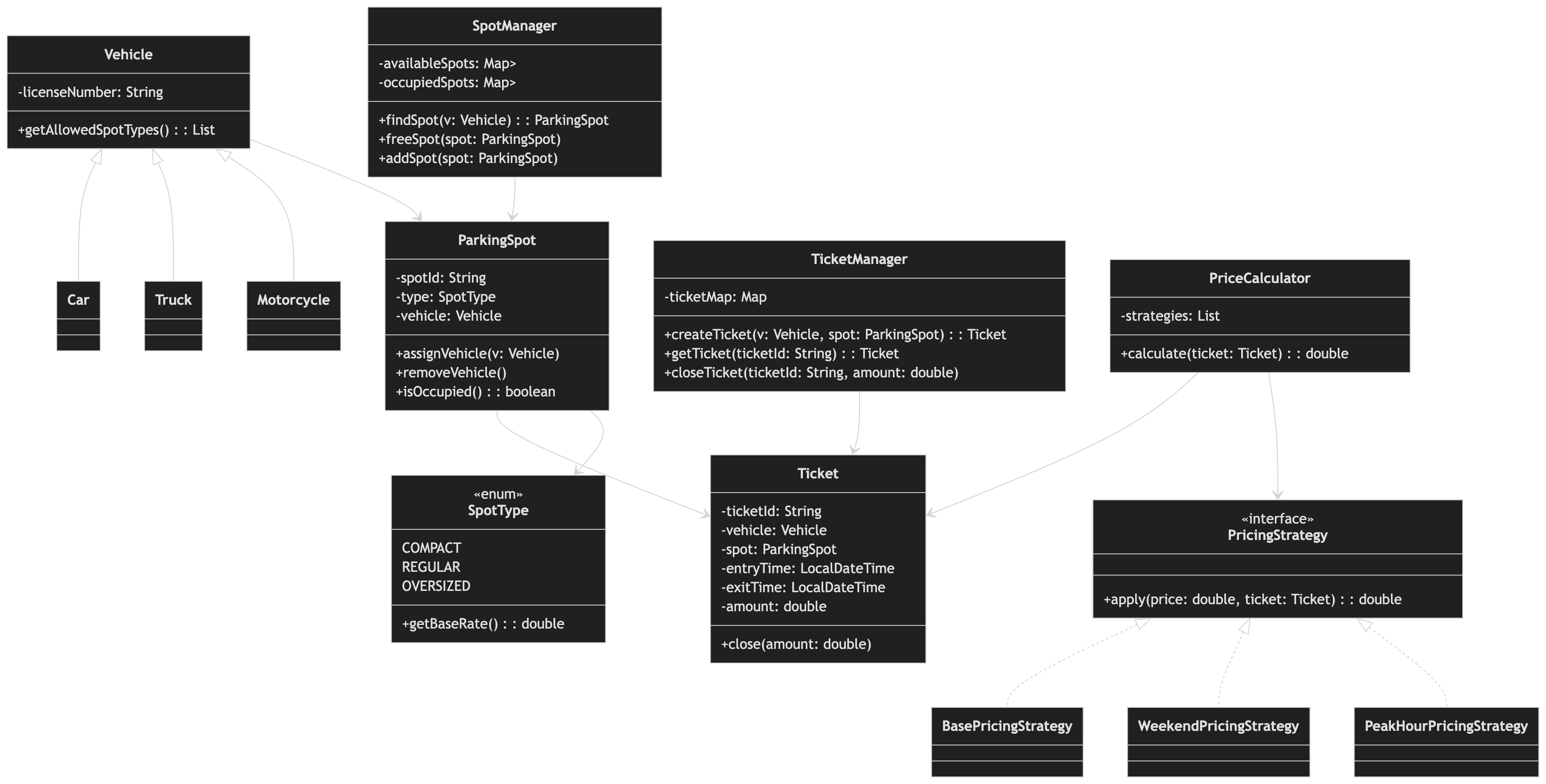
The parking lot acts as the central orchestrator of the system, coordinating all core operations such as finding available spots, generating tickets, calculating fees, and processing payments.
However, handling all these operations within a single class leads to a violation of the Single Responsibility
Principle (SRP). To address this, the ParkingLot class can be designed as a facade, delegating
responsibilities to specialized components.
// ✅ Good design

ParkingLot → SpotManager        : find spot, free spot
ParkingLot → TicketManager      : create ticket, fetch ticket
ParkingLot → PriceCalculator    : calculate fee
ParkingLot → PaymentProcessor   : process payment
This design promotes a clear separation of concerns by ensuring that each component is responsible for a specific piece of functionality.
Sequence Flow
Let's discuss the step-by-step interactions between different system components for the primary use cases, highlighting how responsibilities are coordinated to achieve the desired functionality.
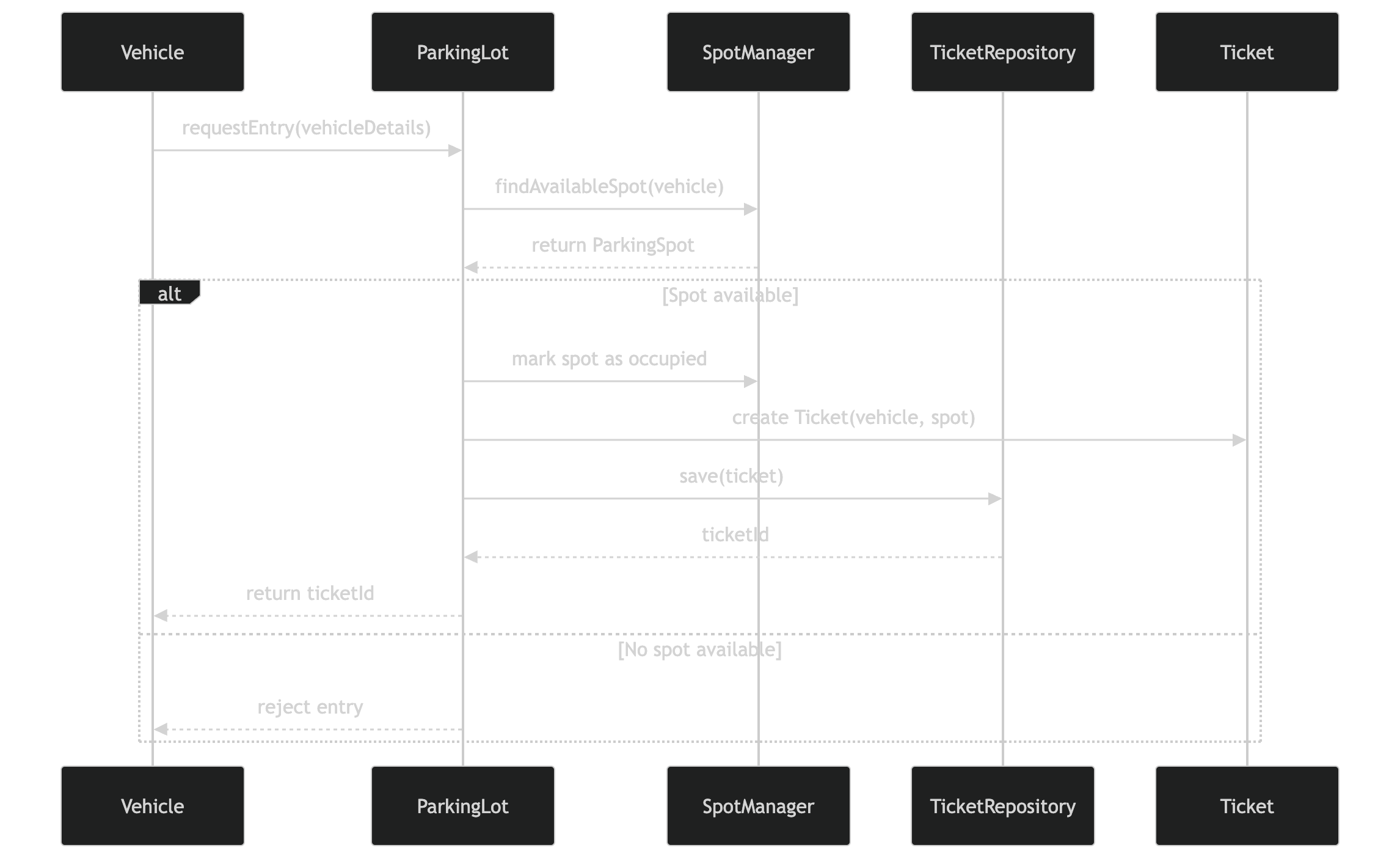
Vehicle Entry (Park Vehicle)
-
The
Vehiclearrives and sends a parking request to theParkingLotsystem, along with its details (licenseNumber). -
The
ParkingLotsystem:-
Calls the
SpotManagertofindAvailableSpot(Vehicle)based on vehicle's allowedList<SpotType>. -
If a spot is found, the
ParkingLotsystem marks theParkingSpotas occupied and calls theTicketManagertocreateTicket(Vehicle, ParkingSpot).
-
-
Returns the generated
ticketIdto the user. Otherwise, the request is rejected if no spot is available.
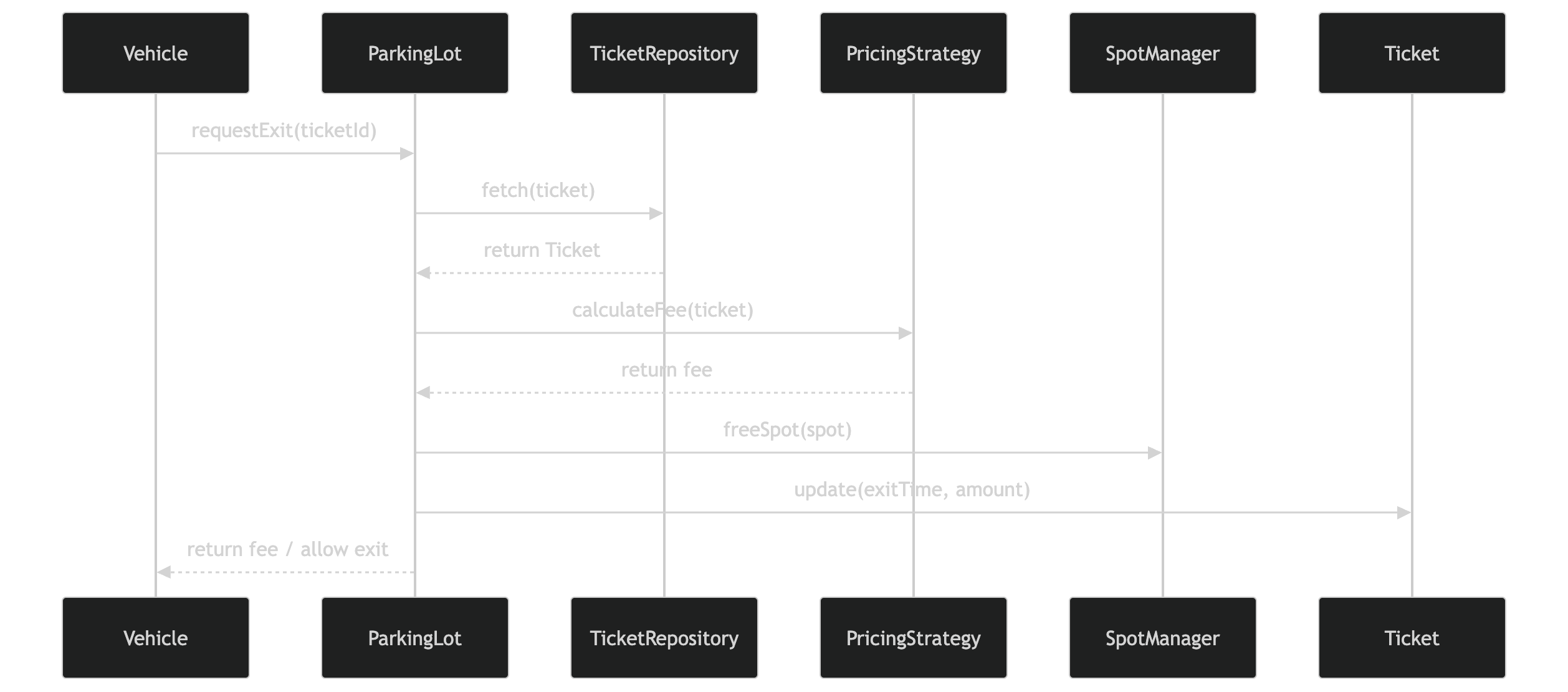
Vehicle Exit (Unpark Vehicle)
-
The
Vehiclearrives at the exit and provides theticketIdto theParkingLotsystem. -
The
ParkingLotsystem:-
Calls the
TicketManagertogetTicket(ticketId)and passes it to thePriceCalculatortocalculateFee(Ticket)based on the duration of the stay. -
Retrieves the
ParkingSpotassociated with theTicketand instructs theSpotManagertofreeSpot(ParkingSpot). -
Updates the
Ticketwith theexitTimeand calculatedamount.
-
-
The parking fee is returned, and the
Vehicleis allowed to exit.
Low Level Design
Let's discuss the low-level design and complexities for each functionality. This will help us build a system that is efficient, scalable, and optimized for real-world usage.
ParkingLot
public class ParkingLot {
    private SpotManager SpotManager;
    private TicketManager ticketManager;
    private PriceCalculator priceCalculator;

    public ParkingLot(SpotManager spotManager,
                        TicketManager ticketManager,
                        PriceCalculator priceCalculator) {
        this.spotManager = spotManager;
        this.ticketManager = ticketManager;
        this.priceCalculator = priceCalculator;
    }

    public Ticket parkVehicle(Vehicle vehicle) {
        ParkingSpot spot = spotManager.findAvailableSpot(vehicle);
        if (spot == null) throw new RuntimeException("No spot available");

        spot.assignVehicle(vehicle);
        Ticket ticket = ticketManager.generateTicket(vehicle, spot);
        return ticket;
    }

    public double unparkVehicle(String ticketId) {
        Ticket ticket = ticketManager.retrieveTicket(ticketId);
        if (ticket == null) throw new RuntimeException("Invalid ticket Id");

        double fee = priceCalculator.calculateFee(ticket);

        ParkingSpot spot = ticket.getSpot();
        spot.removeVehicle();
        spotManager.freeParkingSpot(spot);

        ticket.closeTicket(LocalDateTime.now(), fee);
        return fee;
    }
}
SpotManager
The SpotManager class is responsible for managing parking spot allocation, including
handling queries such as finding an available ParkingSpot for a given vehicle type.
Since any given vehicle type can be accomodated in multiple SpotType, it is efficient to
maintain a Map<SpotType, List<ParkingSpot>>, grouping parking spots by their type. However, if
all spots (both free and occupied) are stored together, we would need to traverse the entire list
each time to find an available spot, resulting in an O(n) lookup.
To optimize this, we can maintain two separate maps: availableSpots (free spots) and
occupiedSpots (in-use spots). When a vehicle arrives, the system only checks the
availableSpots map for the relevant SpotType, eliminating the need to scan all spots. This
improves the lookup time from O(n) to near O(1) for spot allocation.
public class SpotManager {
    private Map<SpotType, List<ParkingSpot>> availableSpots = new HashMap<>();
    private Map<SpotType, List<ParkingSpot>> occupiedSpots = new HashMap<>();

    public SpotManager() {
        for(SpotType type: SpotType.values()) {
            availableSpots.put(type, new ArrayList<>());
            occupiedSpots.put(type, new ArrayList<>());
        }
    }

    public void addSpot(ParkingSpot spot) {
        availableSpots.get(spot.getType()).add(spot);
    }

    public ParkingSpot findAvailableSpot(Vehicle vehicle) {
        List<SpotType> allowedTypes = vehicle.getAllowedSpotTypes();

        for (SpotType type : allowedTypes) {
            List<ParkingSpot> spots = availableSpots.get(type);
            if (!spots.isEmpty()) {
                ParkingSpot spot = spots.remove(0);
                occupiedSpots.get(type).add(spot);
                return spot;
            }
        }
        return null;
    }

    public void freeSpot(ParkingSpot spot) {
        occupiedSpots.get(spot.getType()).remove(spot);
        availableSpots.get(spot.getType()).add(spot);
    }

    /* Bad Design - Violates the Open-Closed Principle. Instead of writing
                    conditional logic, each vehicle should define its own
                    parking rules.

    public List<SpotType> getAllowedSpotTypes(VehicleType type) {
        switch (type) {
            case MOTORCYCLE:
                return List.of(SpotType.COMPACT);
            case CAR:
                return List.of(SpotType.COMPACT, SpotType.REGULAR);
            case TRUCK:
                return List.of(SpotType.OVERSIZED);
        }
        return new ArrayList<>();
    }
    */
}
Vehicle
The Vehicle class represents any vehicle entering the parking lot and serves as an abstract
base class for all specific vehicle types such as Motorcycle, Car, and Truck.
abstract class Vehicle {
    protected String licenseNumber; // accessible within subclasses, even in different packages

    public Vehicle(String licenseNumber) {
        this.licenseNumber = licenseNumber;
    }

    public abstract List<SpotType> getAllowedSpotTypes();
}

class Motorcycle extends Vehicle {
    public List<SpotType> getAllowedSpotTypes() {
        return List.of(SpotType.COMPACT);
    }
}

class Car extends Vehicle {
    public List<SpotType> getAllowedSpotTypes() {
        return List.of(SpotType.COMPACT, SpotType.REGULAR);
    }
}

class Truck extends Vehicle {
    public List<SpotType> getAllowedSpotTypes() {
        return List.of(SpotType.OVERSIZED);
    }
}
ParkingSpot
The ParkingSpot class represents an individual parking space within the parking lot.
Each parking spot supports basic operations to manage its occupancy, including assigning a
Vehicle when occupied and removing the Vehicle when it becomes available.
// ================= ENUMS =================
public enum SpotType {

    COMPACT(10),
    REGULAR(20),
    OVERSIZED(30);

    private final double baseRate;

    SpotType(double baseRate) {
        this.baseRate = baseRate;
    }

    public double getBaseRate() {
        return baseRate;
    }
}

// ================= PARKING SPOT =================
public class ParkingSpot {
    private String spotId;
    private SpotType type;
    private boolean isOccupied;
    private Vehicle vehicle;

    public ParkingSpot(String spotId, SpotType type) {
        this.spotId = spotId;
        this.type = type;
        this.isOccupied = false;
    }

    public boolean isAvailable() {
        return !isOccupied;
    }

    public void assignVehicle(Vehicle vehicle) {
        this.vehicle = vehicle;
        this.isOccupied = true;
    }

    public void removeVehicle() {
        this.vehicle = null;
        this.isOccupied = false;
    }

    public SpotType getType() {
        return type;
    }
}
TicketManager
The TicketManager class encapsulates the logic for generating and managing parking tickets.
During the parking process, it generates a new Ticket by associating the Vehicle with a
ParkingSpot and returns a unique ticketId. During the unparking process, it uses the ticketId to
retrieve the corresponding Ticket, which contains all relevant parking details.
To enable efficient retrieval, the TicketManager maintains a Map<ticketId, Ticket>,
allowing direct, constant-time access to tickets without scanning through all records.
public class TicketManager {
    private Map<String, Ticket> ticketMap;

    public TicketManager() {
        this.ticketMap = new HashMap<>();
    }

    // Create ticket during parking
    public Ticket createTicket(Vehicle vehicle, ParkingSpot spot) {
        Ticket ticket = new Ticket(vehicle, spot);
        ticketMap.put(ticket.getTicketId(), ticket);
        return ticket();
    }

    // Fetch ticket during unparking
    public Ticket getTicket(String ticketId) {
        Ticket ticket = ticketMap.get(ticketId);
        if (ticket == null) {
            throw new RuntimeException("Invalid ticketId");
        }
        return ticket;
    }
}
Ticket
The Ticket class represents a parking session and acts as a record of a vehicle's entry and
exit within the parking lot. It captures essential details such as associated Vehicle, assigned
ParkingSpot, entryTime, and exitTime, along with the total parking amount.
It primarily acts as a data holder with minimal behavior, such as updating the exitTime and
amount.
public class Ticket {
    private String ticketId;
    private Vehicle vehicle;
    private ParkingSpot parkingSpot;
    private LocalDateTime entryTime;
    private LocalDateTime exitTime;
    private double amount;

    public Ticket(Vehicle vehicle, ParkingSpot spot) {
        this.ticketId = UUID.randomUUID().toString();
        this.vehicle = vehicle;
        this.spot = spot;
        this.entryTime = LocalDateTime.now();
    }

    public String getTicketId() {
        return ticketId;
    }

    public LocalDateTime getEntryTime() {
        return entryTime;
    }

    public void closeTicket(LocalDateTime exitTime, double amount) {
        this.exitTime = exitTime;
        this.amount = amount;
    }

    public ParkingSpot getSpot() {
        return spot;
    }
}
PriceCalculator
The PriceCalculator class is responsible for computing the parking fee based on the selected
ParkingSpot (or SpotType) and the duration of the parking session.
Since pricing is not fixed and can vary based on business rules such as hourly rates, weekend pricing, or peak-hour charges, the pricing logic should be flexible and extensible. To achieve this, we can use the Strategy Pattern, where different pricing algorithms are encapsulated into separate strategy classes.
This design allows the system to dynamically switch or combine pricing strategies without modifying existing code, thereby adhering to the Open/Closed Principle and improving maintainability.
public interface PricingStrategy {
    double apply(double currentPrice, Ticket ticket);
}

public class BasePricingStrategy implements PricingStrategy {

    @Override
    public double apply(double currentPrice, Ticket ticket) {
        SpotType type = ticket.getSpot().getType();

        double baseRate = type.getBaseRate(); // from enum
        long hours = Math.max(
                Duration.between(ticket.getEntryTime(), LocalDateTime.now()).toHours(),
                1
        );

        return baseRate * hours;
    }
}

public class WeekendPricingStrategy implements PricingStrategy {

    @Override
    public double apply(double currentPrice, Ticket ticket) {
        DayOfWeek day = LocalDateTime.now().getDayOfWeek();

        if (day == DayOfWeek.SATURDAY || day == DayOfWeek.SUNDAY) {
            return currentPrice * 1.5; // 50% surge
        }

        return currentPrice;
    }
}

public class PriceCalculator {

    private List<PricingStrategy> strategies;

    public PriceCalculator(List<PricingStrategy> strategies) {
        this.strategies = strategies;
    }

    public double calculate(Ticket ticket) {
        double price = 0;

        for (PricingStrategy strategy : strategies) {
            price = strategy.apply(price, ticket);
        }

        return price;
    }
}
Main
public class Main {

    public static void main(String[] args) {

        // Initialize SpotManager
        SpotManager spotManager = new SpotManager();
        spotManager.addSpot(new ParkingSpot("S1", SpotType.COMPACT));
        spotManager.addSpot(new ParkingSpot("S2", SpotType.REGULAR));
        spotManager.addSpot(new ParkingSpot("S3", SpotType.OVERSIZED));

        // Initialize TicketManager (in-memory)
        TicketManager ticketManager = new TicketManager();

        // Initialize Pricing Strategies
        List<PricingStrategy> strategies = List.of(
                new BasePricingStrategy(),
                new WeekendPricingStrategy(),
                new PeakHourPricingStrategy()
        );

        PriceCalculator priceCalculator = new PriceCalculator(strategies);

        // Simulate Vehicle Entry
        System.out.println("---- VEHICLE ENTRY ----");

        Car car = new Car("DL-123");
        ParkingSpot spot = spotManager.findSpot(car);

        if (spot == null) {
            System.out.println("No parking spot available!");
            return;
        }

        spot.assignVehicle(car);

        Ticket ticket = ticketManager.createTicket(car, spot);

        System.out.println("Vehicle parked. Ticket ID: " + ticket.getTicketId());

        // Simulate some time passing (for demo only)
        try {
            Thread.sleep(2000); // 2 seconds
        } catch (InterruptedException e) {
            e.printStackTrace();
        }

        // Simulate Vehicle Exit
        System.out.println("\n---- VEHICLE EXIT ----");

        Ticket fetchedTicket = ticketManager.getTicket(ticket.getTicketId());

        double fee = priceCalculator.calculate(fetchedTicket);

        spotManager.freeSpot(fetchedTicket.getSpot());

        ticketManager.closeTicket(ticket.getTicketId(), fee);

        System.out.println("Parking fee: ₹" + fee);
        System.out.println("Vehicle exited successfully.");
    }
}
Final UML Diagram